Trick or Treat Yourself to Frights & Delights Twitch Drops Rewards
Spiritfest is back, and the ghosts and ghoulies aren't going to settle themselves! The Fall's Faire: Frights & Delights (Patch 0.207) update brings the spooky season back to Kilima Village, with Elouisa's Bulletin Board calling on Palians everywhere to gather up the celebration’s scariest supplies. To help you jump straight into the festivities, we have a brand new lineup of Twitch Drops featuring the exact materials Elouisa is asking for, a trio of Prize Bags led by the returning Pumpkin Pod, and the return of a purr-fectly stylish pair of glasses. Tune-in, spend time with your favorite creators, and collect these limited-time rewards!
You can start collecting your in-game 👻 rewards 👻 by viewing your favorite Palia Twitch Drops-participating content creators today through Tuesday, October 13__. Full details on how to receive the free, limited-time in-game rewards are included below:
The Rewards
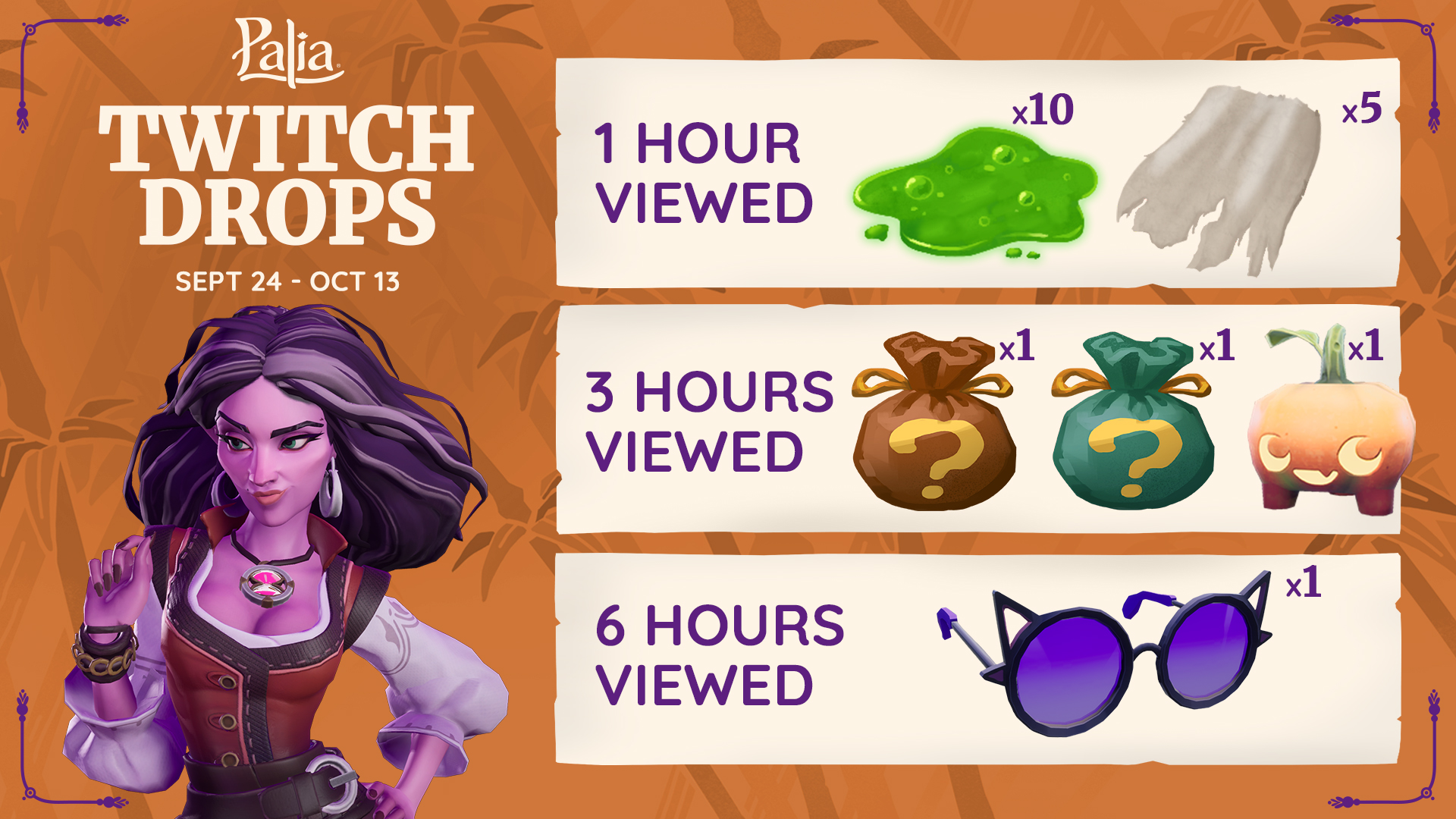
From today through noon PT on Tuesday, October 13, tune-in to your favorite content creators to receive these (free!) Twitch Drops rewards:
- 1-hour Viewed: Tier One Rewards
- 3-hours Viewed: Tier Two Rewards
- 6-hours Viewed: Tier Three Rewards
How to Redeem Twitch Drops Rewards
Log-in to your Twitch Account when watching a live Palia stream from a Twitch Drops-enabled content creator. You will know that Drops are enabled by identifying the informational dialogue in the creator’s Twitch Chat that details the rewards and redemption view-length.
After watching the stream for the required amount of time, you will receive a notification on your Twitch Notifications button. Click the notification to access the Drops Inventory where you can view your progress towards the active Drops and connect your Twitch account to your Palia account.
Claim your reward(s) by clicking on any rewards listed in the Drops Inventory.
Open Palia and navigate to the in-game “News” section of the menu to pick-up your brand new item(s).
Enjoy your Twitch Drops rewards!
Content Creators: How to Enable Palia Drops
Connect your Twitch account to your Palia account by heading to Palia Accounts Connections and clicking the Twitch “Link Account” button.
Head to your Twitch Dashboard and toggle the Enable Drops button.
That’s it! Enjoy playing and giving your audience the opportunity to earn free rewards!
FAQ:
Who should I watch?
Check out our Palia Partners Stream Team on Twitch to view our official Palia Partners – or you can view anyone who has Palia Twitch Drops enabled.
Who is eligible to opt-in for Twitch Drops rewards?
Anyone who has linked their account to Palia can stream Palia on Twitch, enable Twitch Drops, and/or receive Twitch Drops rewards.
Do viewers need to actively watch and engage with the stream to receive Twitch Drops rewards?
It’s a whole lot of fun to interact with your favorite content creators! But you do not need to participate in chat or engage with the stream in other ways to earn Twitch Drops rewards. As long as your sound is on, you are eligible for view-hours to earn rewards.
Do the streamers need to be playing Palia? Yes. The streamers will need to be playing Palia in the Palia category on Twitch.